CapCut vs VN Video Editor (2026 Complete Guide): Which One Should You Use?
Choosing the right video editing app can feel confusing, especially when both options look powerful. CapCut and VN Video Editor are two of the most popular tools today, and each one solves a different problem for creators.
This guide explains everything in a clear, step-by-step way. It starts from basic concepts and gradually moves toward advanced insights. By the end, you will understand not only which app is better, but why it is better for your specific goal.
Introduction
Video content is now one of the fastest ways to grow online. Whether you want to post on TikTok, YouTube, or Instagram, editing is no longer optional. It directly affects how many people watch your content, how long they stay, and whether they follow you.
CapCut and VN Video Editor are both free tools that help you edit videos, but they are built with different philosophies:
- CapCut focuses on speed and automation
- VN focuses on control and precision
This difference shapes everything else.
What Is Video Editing? (Simple but Complete Understanding)
Before comparing apps, you need a strong foundation.
Video editing is the process of:
- Selecting useful parts of your footage
- Arranging clips in order
- Enhancing visuals and sound
- Adding text, music, and effects
Core Concepts You Must Understand
1. Timeline
This is where your video is built. Think of it like a horizontal line where time moves from left to right.
2. Clips
Each video or audio piece you import becomes a clip.
3. Cuts
Removing unwanted parts improves pacing.
4. Layers
Some editors allow multiple layers (video, text, audio stacked together).
Understanding these concepts helps you learn any editing software faster.
Overview of CapCut
CapCut is designed for people who want quick results with minimal effort.
What Is CapCut?
It is a beginner-friendly video editor with built-in automation and templates. It is widely used for short-form content like TikTok and YouTube Shorts.
Key Features of CapCut
Templates
You select a template, add your clips, and the app edits everything automatically.
This is powerful because:
- It reduces editing time to minutes
- It follows trending styles
- It requires no technical skill
Auto Captions
The app converts speech into subtitles automatically.
Why this matters:
- Many viewers watch without sound
- Subtitles increase watch time
- It improves accessibility
Effects and Filters
CapCut includes a large library of visual effects.
Examples:
- Glow effects
- Motion blur
- Color filters
These help make videos visually engaging, but must be used carefully.
AI Tools
CapCut includes automation tools such as:
- Background removal
- Auto cut
- Object tracking
These tools analyze video content and apply changes without manual work.
Pros of CapCut
- Very easy to learn
- Fast editing workflow
- Strong for social media trends
- Built-in automation
Cons of CapCut
- Limited manual control
- Some features require internet
- Can feel restrictive for advanced users
Overview of VN Video Editor
VN is designed for users who want deeper control over editing.
What Is VN Video Editor?
It is a free, professional-style video editor that allows detailed customization. It is often used for YouTube videos and storytelling content.
Key Features of VN
Multi-Layer Timeline
VN allows multiple layers:
- Video
- Audio
- Text
- Effects
This structure gives you flexibility to build complex edits.
Precision Editing
You can cut videos at exact points, even frame by frame.
Why this matters:
- Cleaner transitions
- Better storytelling
- More professional output
Speed Control
VN allows advanced speed changes.
Instead of simple slow motion, you can:
- Gradually increase speed
- Create cinematic motion
Color Grading
You can manually adjust:
- Brightness
- Contrast
- Saturation
This changes the mood of your video.
Export Control
VN allows control over:
- Resolution
- Frame rate
- Bitrate
This affects final video quality.
Pros of VN
- No watermark
- Full control over editing
- Professional-level tools
- Works offline
Cons of VN
- Takes time to learn
- No built-in templates
- Slower workflow for beginners
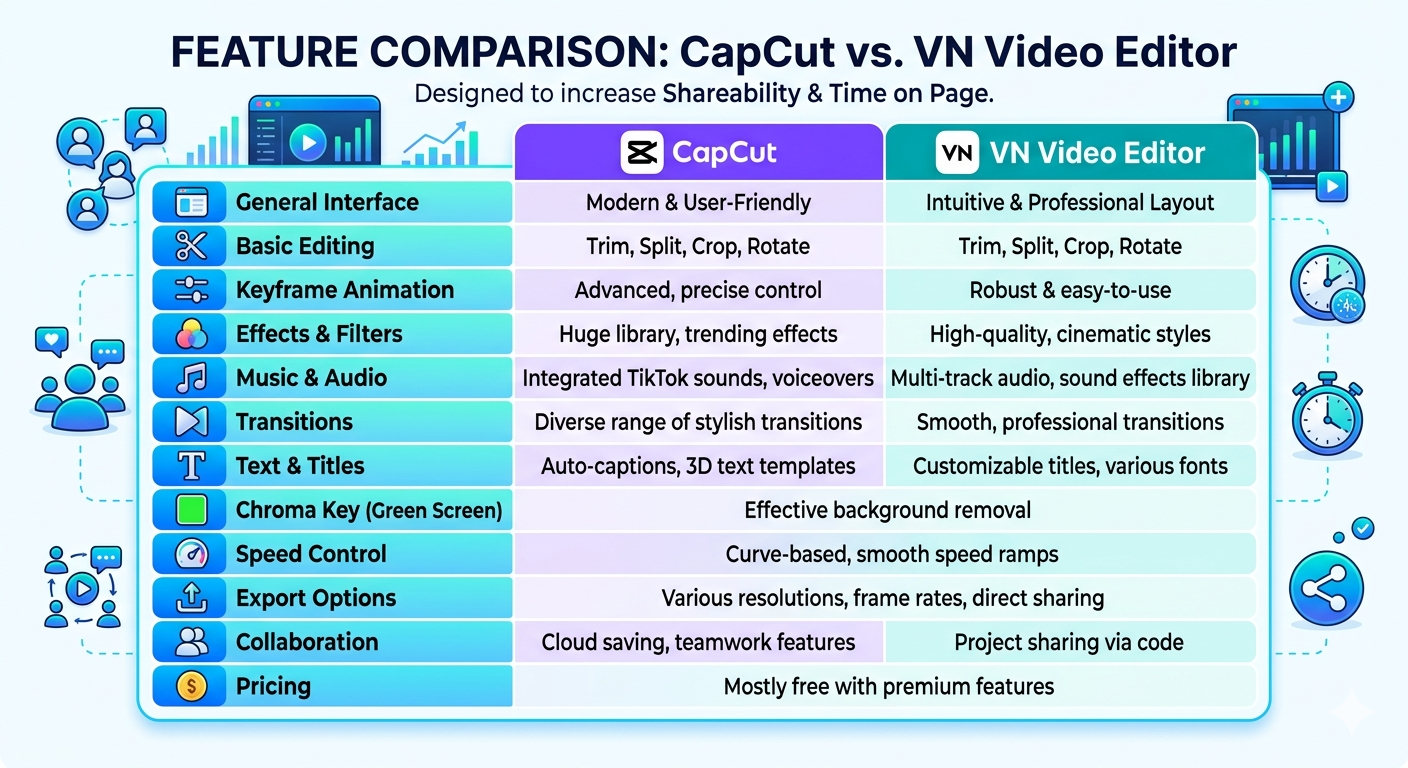
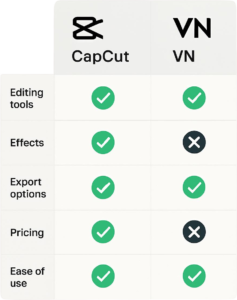
CapCut vs VN – Quick Comparison
| Feature | CapCut | VN |
|---|---|---|
| Ease of Use | Very easy | Moderate |
| Editing Speed | Fast | Slower |
| Control | Limited | High |
| Templates | Yes | No |
| Best For | Short videos | Long videos |
User Interface and Ease of Use
CapCut Interface
CapCut is designed for simplicity:
- Large buttons
- Guided steps
- Minimal clutter
You can start editing without tutorials.
VN Interface
VN looks more like professional software:
- Timeline with layers
- Multiple tools visible
- More options
It may feel confusing at first, but becomes powerful with practice.
Which Is Easier?
CapCut is easier for beginners. VN requires learning but offers more flexibility.
Editing Workflow Comparison
Editing in CapCut
- Open app
- Tap “New Project”
- Add clips
- Trim unwanted parts
- Add music and text
- Apply effects
- Export video
This process is quick and guided.
Editing in VN
- Create new project
- Import clips
- Arrange on timeline
- Cut precisely
- Add multiple layers
- Adjust audio and color
- Export with settings
This process is more detailed.
Key Difference
Choosing between CapCut and VN depends on whether you value speed and AI-driven automation or manual, professional-level control. CapCut is the go-to for trending social media content, while VN is often preferred for precise, technical edits like travel b-roll and YouTube videos.
| Feature | CapCut | VN Video Editor |
|---|---|---|
| Best For | TikTok/Reels, AI-heavy effects, and quick templates | YouTube, travel b-roll, and precise manual editing |
| User Interface | Beginner-friendly; optimized for vertical social content | Cleaner, more traditional “pro” timeline layout |
| AI Tools | Extensive: Auto-captions, background removal, and AI effects | Limited: Standard auto-captions; fewer automated AI features |
| Audio Control | Good music/SFX library; some basic voice isolation tools | Superior precision: Highly accurate waveforms and seamless fading |
| Speed Control | Features smooth slow-motion and “Velocity” effects | Advanced curve-based speed ramping for cinematic flow |
| Watermark | Adds an “Ending” clip that must be manually deleted | None; standard export is watermark-free |
| Export Options | Up to 4K; good quality but social-media-focused compression | Highly customizable bitrate, FPS, and 4K/60fps support |
| Platforms | iOS, Android, Windows, Mac, and Web browser | iOS, Android, and Mac (limited desktop feature set) |
Features Comparison in Detail
Templates vs Manual Editing
CapCut templates:
- Fast
- Easy
- Less unique
VN manual editing:
- Slower
- Fully customizable
- More original
Effects and Transitions
CapCut:
- Pre-made effects
- Trend-focused
VN:
- Fewer presets
- More control
Text and Subtitles
CapCut:
- Auto captions
- Animated text
VN:
- Manual text control
- Better positioning
Audio Editing
CapCut:
- Simple controls
- Basic adjustments
VN:
- Advanced layering
- Audio synchronization
Speed Control and Keyframes
- Simple keyframes
- Easy animations
VN:
- Advanced keyframe curves
- More precise control
Performance and Device Compatibility
Why Performance Matters
Editing apps require:
- CPU power
- RAM
- Storage
CapCut Performance
- Can lag on low-end devices
- Heavy features increase load
VN Performance
- More optimized
- Runs smoother on weaker systems
Export Quality and File Settings
Important Concepts
Resolution
Higher resolution means clearer video.
Frame Rate
Higher frame rate means smoother motion.
Bitrate
Higher bitrate means better quality but larger file size.
CapCut Export
- Simple options
- Limited control
VN Export
- Full control over settings
- Better for professional output
Online vs Offline Editing
CapCut:
- Requires internet for templates and some features
VN:
- Fully offline capable
This makes VN more reliable in low-connectivity environments.
Best App for Different Platforms
TikTok
CapCut is better because:
- Templates match trends
- Faster workflow
YouTube
VN is better because:
- More control
- Better storytelling tools
Instagram Reels
CapCut works better due to speed and trends.
Learning Curve and Skill Development
CapCut:
- Learn in 1–2 days
- Quick results
VN:
- Takes 1–2 weeks
- Builds long-term skills
My Personal Experience
1. The “VN for Precision” Experience
- The Big Plus: The curve-based speed ramping in VN is often smoother than CapCut’s. If you’re doing cinematic b-roll or travel edits, VN gives you much more control over the flow.
- The Learning Curve: You’ve probably noticed the vertical timeline is cleaner, making it easier to manage multiple layers of text and music without the screen feeling cluttered
2. The “CapCut for Efficiency” Experience
- The Big Plus: The Auto-Captions feature is a life-saver. Doing those manually in VN is a nightmare, but in CapCut, it’s one click.
- The Creative Edge: You’ve likely used the Background Remover or the massive library of trending sounds and memes. It’s built for speed and “virality” rather than technical perfection
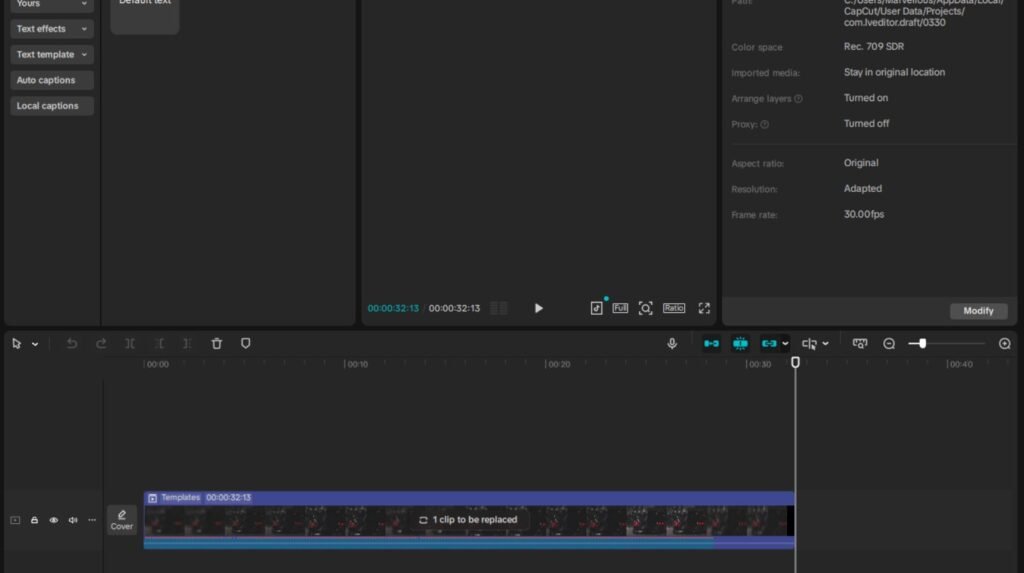
The “Hybrid” Workflow (What Many Pros Do)
- Cut the “Skeleton” in VN: Do your heavy lifting, precise trimming, and color grading in VN because the interface is more stable for long edits.
- Add the “Polish” in CapCut: Export that file, bring it into CapCut to add the trending transitions, AI effects, and auto-captions.
Did you find yourself getting frustrated with CapCut’s storage usage (it gets huge very fast) or VN’s lack of advanced AI tools like “Body Effects”?
Common Mistakes Beginners Make
1. The “Default Watermark” Oversight
- CapCut: It automatically adds a “Closing” clip with the CapCut logo at the end of every timeline. Many beginners forget to delete this.
- VN: Often adds a default “Title” card at the very end.
- Pro Tip: In CapCut settings, you can toggle off “Add default ending” so you never have to manually delete it again.
2. Messy Audio Transitions (The “Pop” Sound)
- The Mistake: Leaving raw cuts between clips with loud background noise or music.
- Experience Insight: Use the “Fade In/Out” tool on every audio clip. Even a tiny 0.1s fade at the start and end of a clip removes the “pop” and makes the audio transition seamless
3. Neglecting Adjustment Layers
- The Problem: If you have 50 clips, and you decide the video is too dark, you have to change 50 clips. This also leads to inconsistent colors if you miss one.
- The Fix: Use Adjustment Layers (found in the “Adjust” menu). Place one long bar across your entire timeline. Any color or sharpness changes you make to that layer will apply to every clip underneath it instantly.
4. Overusing “Cheese” Transitions
- The Mistake: Using a different, loud transition between every single cut. It’s distracting and makes the video feel like a template rather than a story.
- Experience Insight: Most professional edits use Simple Cuts. Save transitions for when there is a major shift in the story or location. If you must use them, stick to “Pull In” or “Crossfade” for a cleaner look
5. Ignoring Keyframes for Smoothness
- The Mistake: Failing to add subtle movement to overlays.
- Experience Insight: Use Keyframes (the diamond icon) to create subtle “zooms” or “slides” for your text and images. A slow 105% zoom-in over 5 seconds makes a static image feel like part of a dynamic video.
6. Exporting with Incorrect Settings
- The Mistake: Cranking every setting to the maximum or leaving them at the default “Smart HDR,” which can sometimes blow out your colors.
- Pro Setting: For most social media, export at 1080p, 30fps, and a Higher Bitrate (Code Rate). This is the “sweet spot” for quality without getting compressed poorly by Instagram or TikTok
Best Strategy: Using Both Apps
A smart approach combines both tools.
Step 1
Use CapCut for:
- Quick content
- Testing ideas
Step 2
Use VN for:
- Detailed editing
- Final production
This balances speed and quality.
Also Read : Best Mobile Editing Apps
FAQs
Is CapCut better than VN?
It depends on your goal. CapCut is better for speed, VN is better for control.
Which app is best for beginners?
CapCut is easier to start with.
Can VN replace CapCut?
Yes, but it requires more effort and time.
Which app is better for YouTube?
VN is better for long-form content.
Does CapCut have a watermark?
Sometimes, depending on features used.
———————————————————————————————————————
Final Verdict
CapCut and VN Video Editor solve the same problem in two very different ways, and the better choice depends entirely on your goal, not just the features.
CapCut is built for speed, simplicity, and trend-based content. It removes friction. You open the app, choose a template or use auto tools, and produce a polished video in minutes. This makes it extremely effective for platforms where volume and timing matter, such as TikTok or YouTube Shorts. If your strategy depends on posting frequently, testing ideas quickly, and riding trends, CapCut aligns perfectly with that workflow.
VN Video Editor operates on a different philosophy. It prioritizes control, precision, and creative flexibility. You manage layers, fine-tune cuts, adjust colors, and shape the pacing manually. This takes more time, but the output is more intentional and structured. For long-form content, educational videos, or storytelling formats where quality and clarity matter more than speed, VN becomes the stronger tool.
From a skill-building perspective, the difference becomes even clearer. CapCut lowers the barrier to entry, but VN expands your capability. One helps you start, the other helps you improve.
A practical way to think about it:
- If you want fast growth and quick content production, choose CapCut
- If you want deep editing skills and professional-level output, choose VN
- If you want the strongest long-term advantage, use both strategically
Many experienced creators follow a hybrid approach. They use CapCut to experiment, create drafts, and publish frequently. Then they use VN to refine important projects where quality matters more than speed.
In the end, neither app is universally “better.” Each one is optimized for a different stage of a creator’s journey. The real advantage comes from understanding when to use speed and when to use control.
So the better question is not which app is better, but what kind of creator you want to become.
Conclusion
Video editing is not about choosing the “perfect” app. It is about understanding your goal and using the right tool at the right time.
CapCut helps you start fast.
VN helps you grow deeper.
The real advantage comes when you understand both and use them strategically.
Now consider your path carefully.
Are you optimizing for speed, or are you building mastery?
Ping back : Best Video Editing Apps 2026
Ping back: How to Edit TikTok Videos
Ping Back: Low-End PC Video Editing Guide